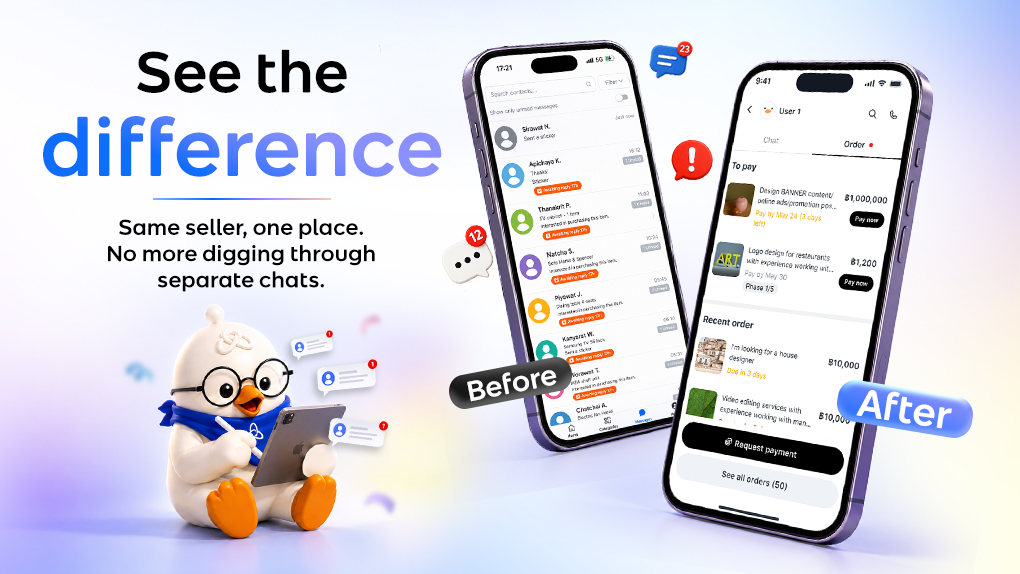
Managing multiple orders with the same person should feel simple, not scattered.
That’s why we introduce a new chat and order management experience designed to help buyers and sellers keep everything connected in one place.
What’s changing?
- One shared workspace for every buyer and seller pair
Previously, every new order came with a separate chat. Now, chats are grouped by buyer and seller pairs, making it easier to continue conversations and manage ongoing work without jumping between multiple chat rooms.
- Conversation across orders now stay connected
Messages, files, and updates from your orders with the same person will now live in one continuous workspace. This makes it easier to revisit past discussions, track project history, and pick up where you left off.
- Manage active orders directly from chat
You can now view active orders and access important order actions directly inside the chat workspace, so managing work becomes faster and more convenient.
- Easier access to shared files and media
Files and media shared during conversations are now easier to find, so you can quickly revisit important documents whenever needed.
What can you do inside the new Chat and Order?

- Activity tab / Order Management Page
What can you do here?
Go to the Activity tab to view all your orders across different freelancers and buyers, regardless of their status.
You can also:
- Switch between roles to view orders as a Buyer or Freelancer.
- Filter orders by status to quickly find the orders you’re looking for.
- Make a payment by clicking the Pay Now button on eligible orders.
- View order details by selecting an order from the list to see its progress, requirements, files, and other information.
- Chat room

To manage all your chats and orders with the same seller, simply open the chat room. From there, you can access both the Chat and Order tabs to view conversations, track order progress, and manage your work in one place.
Inside the chat room, you can:
- Continue conversations with the same seller across multiple orders.
- View and manage active orders in the Order tab.
- Access order details and track the progress of your projects.
- Find shared files and media more easily without scrolling through old messages.
- Review past discussions and project history in one continuous conversation.
- Make payments directly from eligible orders.
- Request payment (for freelancers) using the button above the chat box or through the Order tab.
Freelancers can request payment by ticking the button above the chat box or by navigating to the Order tab within the chat room.

For payment requests, freelancers can either send an instant payment request by simply selecting a service and entering the amount, or create a more detailed quotation by including the project scope, timeline, and other important requirements.
To create a detailed quotation, simply tick the “Create a full/milestone quotation” checkbox.
By enabling this option, you can also activate Milestone Projects, allowing the project to be divided into multiple phases based on the agreement between you and the buyer. This makes it easier to manage complex projects with separate deliverables, timelines, and payments for each phase.
Why We Made This Change
Many buyers and sellers continue working together across multiple orders. Over time, managing separate chats for every order could feel scattered and harder to keep up with.
With this update, we want working together to feel more natural. Less switching back and forth, less searching through old chats, and an easier way to continue ongoing work with the same person.
We’re excited for you to try the new experience, and we’re just getting started, more improvements are on the way!